Last Updated: 4/7/2026
Simulation Engine Architecture
The simulation engine is the heart of Agricultural Microworlds, orchestrating the game loop, executing student-written Blockly code, and coordinating all simulation managers. Understanding this architecture is essential for contributing to the project.
System Overview
The simulation engine follows a classic game loop pattern with a twist: student code runs in Web Workers to prevent blocking the main thread. The engine maintains an immutable state system where each frame clones the previous state, runs all simulation managers to calculate updates, then commits the new state atomically.
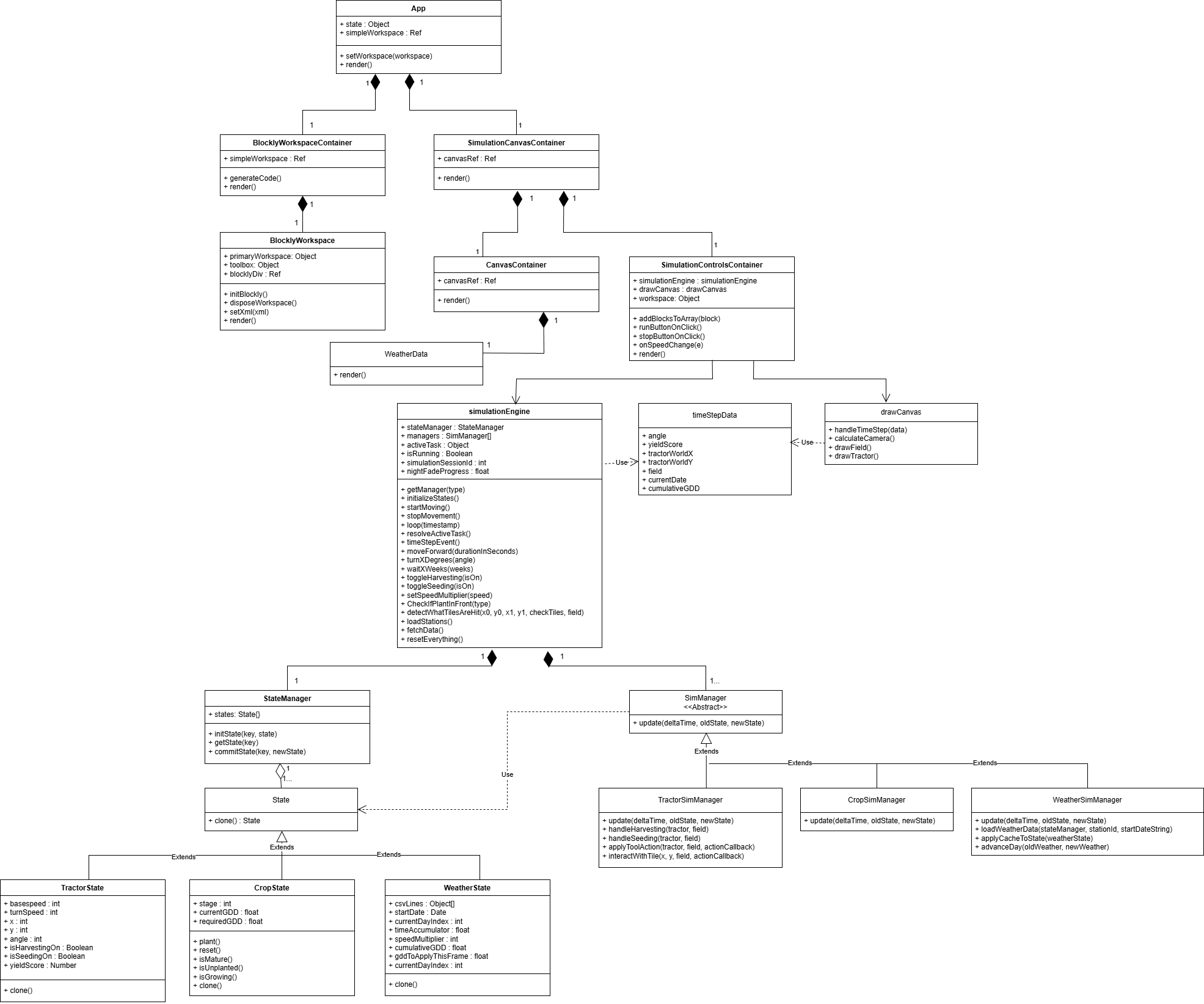
This diagram shows the separation between simulation logic and rendering. The simulationEngine class serves as the central coordinator, managing the game loop, state transitions, and communication with Web Workers.
Core Components
SimulationEngine Class
The simulationEngine class (located in src/SimulationEngine/simulationEngine.js) extends EventTarget to dispatch events when the simulation updates. It maintains:
- StateManager: Holds all simulation state (field, weather, vehicles, tractor)
- Managers array: Contains
WeatherSimManager,CropSimManager, andTractorSimManager - Active tasks map: Tracks ongoing asynchronous commands (movement, turns, waits)
- Loop variables: Frame timing, animation ID, session ID for cancellation
Key constants define the simulation world:
this.TILE_SIZE = 8;
this.ROWS = 300;
this.COLS = 300;
this.worldPixelWidth = 2400;  // 300 * 8
this.worldPixelHeight = 2400;
The Game Loop
The loop(timestamp) method runs every frame via requestAnimationFrame. Here’s the flow:
- Calculate simulated time: Real delta time is multiplied by the weather speed multiplier to allow time acceleration
 const realDeltaTime = (timestamp - this.lastFrameTime) / 1000;
 const speedMult = weather.getSpeedMultiplier();
const simDeltaTime = Math.min(realDeltaTime, 0.1) * speedMult;- Clone all states: Each state object is cloned to create a working copy
 for (const key in oldStates) {
   if (oldStates[key] && typeof oldStates[key].clone === 'function') {
     nextStates[key] = oldStates[key].clone();
   }
}- Run all managers: Each SimManager’s
update()method receivessimDeltaTime,oldStates, andnextStates
 for (const sm of this.managers) {
   sm.update(simDeltaTime, oldStates, nextStates);
}- Process active tasks: Check if movement timers have expired or turns have completed
- Commit new states: Replace old states with the calculated new states
- Dispatch render event: Fire
simulationEngineCreatedwith render data - Check game over: Stop the loop if
isGameOveris true
The loop runs at the browser’s refresh rate (typically 60 FPS), but simulation time can be faster or slower depending on the speed multiplier.
Web Worker Pattern
Why Web Workers? Student-written Blockly code can contain infinite loops or long-running operations. Running this code on the main thread would freeze the UI. Web Workers execute code in a separate thread, keeping the simulation responsive.
How It Works
- Student clicks “Run”: The Blockly workspace generates JavaScript code
- Code is sent to a Web Worker: The worker executes the generated code
- Worker sends commands: When the code calls
moveForward(5), the worker posts a message to the main thread:
 {
   command: "moveForward",
   args: [5],
   vehicleType: VEHICLES.HARVESTER,
   requestId: 123
}- Engine handles the command:
handleWorkerMessage()routes the command to the appropriate method - Async command executes: The engine creates an active task and returns a Promise
- Worker waits: The worker blocks until it receives a
RESPONSEmessage - Engine resolves: When the timer expires, the engine sends
{ type: "RESPONSE", requestId: 123 } - Worker continues: The next line of student code executes
This pattern allows student code to appear synchronous (moveForward(5); turnLeft();) while actually being asynchronous under the hood.
Event System
The engine dispatches two main events:
simulationEngineCreated
Fired every frame with render data. Components listen for this event to update the canvas:
this.dispatchEvent(
  new CustomEvent("simulationEngineCreated", {
    bubbles: true,
    detail: timeStepData
  })
);
The detail object contains:
- stats: Yield score, current date, cumulative GDD, rainfall
- field: Field dimensions, camera position, tile data
- vehicles: Vehicle positions, angles, states
- dayCycle: Current time for day/night rendering
simulationCrashed
Fired when isGameOver becomes true, signaling the simulation has ended (either successfully or due to an error).
State Coordination
The engine uses a read-old, write-new pattern to prevent race conditions:
- Old states are read-only during a frame
- New states are mutable working copies
- Managers read from
oldStatesand write tonextStates - At frame end,
nextStatesbecomes the newoldStates
This ensures SimManagers can’t interfere with each other. For example:
WeatherSimManagerreadsoldStates.weatherand writesnextStates.weatherCropSimManagerreadsoldStates.weather(for GDD) and writesnextStates.field(crop growth)- Both managers see the same consistent old state, preventing order-of-execution bugs
Active Task System
Asynchronous commands (movement, turns, waits) are tracked in the activeTasks Map:
this.activeTasks.set(vehicleType, {
  type: "TIMER",
  timeLeft: 5.0,
  resolve: promiseResolveFunction,
  sessionId: 42
});
Each frame, the loop decrements timeLeft by simDeltaTime. When it reaches zero, the task’s resolve() function is called, unblocking the Web Worker.
The sessionId ensures tasks from previous runs are ignored when the simulation is stopped and restarted.
Initialization Flow
When the engine starts:
- StateManager is created: Empty state container
- Managers are instantiated: Weather, Crop, Tractor managers
- initializeStates() runs:
- Creates
WeatherStatewith default values (or cached K-State Mesonet data) - Creates two
ImplementStateobjects (harvester at(x: -150, y: 1150), seeder at(x: -150, y: 1250), both off-screen) - Creates
BitmapFieldState(300×300 tiles, initialized to mature corn) - Sets
activeVehicleTypetoVEHICLES.HARVESTER - Sets
isGameOverto false
- timeStepEvent() fires: Initial render data is dispatched
- Engine waits: Loop doesn’t start until
startMoving()is called
Key Methods
| Method | Purpose |
|---|---|
startMoving() | Begins the game loop |
stopMovement() | Halts the loop, increments session ID, clears tasks |
loop(timestamp) | Main game loop (called every frame) |
moveForward(duration, vehicleType) | Async: Move vehicle for N seconds |
turnXDegrees(angle, vehicleType) | Async: Turn vehicle by N degrees |
waitXWeeks(weeks, vehicleType) | Async: Pause vehicle for N weeks (simulated time) |
toggleHarvesting(isOn, vehicleType) | Toggle harvester header on/off |
toggleSeeding(isOn, vehicleType) | Toggle seeder on/off |
switchCropBeingPlanted(crop, vehicleType) | Change seeder’s crop type |
handleWorkerMessage(data, worker) | Route worker commands to engine methods |
resetEverything() | Stop loop, clear tasks, reinitialize states |
getManager(type) | Retrieve a specific SimManager instance |
getActiveVehicle() | Get the vehicle object for the user-selected vehicle |
getTargetVehicle(targetType) | Get a specific vehicle by type |
From Student Click to Simulation Update
Here’s the complete flow when a student clicks “Run”:
- Blockly generates code: The workspace converts blocks to JavaScript
- Code is sent to Web Worker: Worker starts executing
- **Worker calls
moveForward(5)**: Posts message to main thread - Engine receives message:
handleWorkerMessage()is called - Engine creates active task:
activeTasks.set(vehicleType, { type: "TIMER", timeLeft: 5.0, ... }) - Engine returns Promise: Worker blocks waiting for response
- Game loop runs: Each frame decrements
timeLeftbysimDeltaTime - TractorSimManager updates: Reads
vehicle.isMoving = true, calculates new position - States are committed: New vehicle position becomes official
- Render event fires: Canvas updates, tractor moves on screen
- Timer expires:
timeLeft <= 0, engine callsresolve() - Worker receives response: Unblocks and continues to next line
- Next command executes: Process repeats
This architecture keeps the UI responsive even when student code contains long-running operations, while maintaining the illusion of synchronous execution.
Why This Design?
The simulation engine’s architecture solves several key problems:
Non-blocking execution: Web Workers prevent student code from freezing the browser.
State consistency: The immutable commit pattern prevents SimManagers from interfering with each other, eliminating race conditions.
Time acceleration: The speed multiplier allows students to see crop growth in seconds rather than waiting for real-time weeks to pass.
Modularity: Each SimManager is independent, making it easy to add new simulation systems (soil, pests, irrigation) without modifying the core engine.
Session management: The session ID system ensures old tasks are ignored when the simulation restarts, preventing stale commands from affecting new runs.
Understanding this architecture is the foundation for working with the simulation managers, state system, and Blockly integration.
What’s Next
Now that you understand the simulation engine’s game loop and Web Worker pattern:
- State Management System: Learn how StateManager coordinates simulation state
- Simulation Managers: Understand how weather, crops, and tractors are simulated
- Blockly Blocks Reference: Learn what commands students can program