Last Updated: 4/7/2026
Planned Database Schema
Important: The PostgreSQL database is currently NOT integrated into the Agricultural Microworlds application. While the database service is provisioned in the Docker Compose configuration, no database connection, authentication system, or data persistence layer exists in the codebase as of the current sprint. This document describes the planned schema for future implementation.
Database Diagram
The planned database schema supports student and teacher portals, lesson management, and code persistence:
Schema Overview
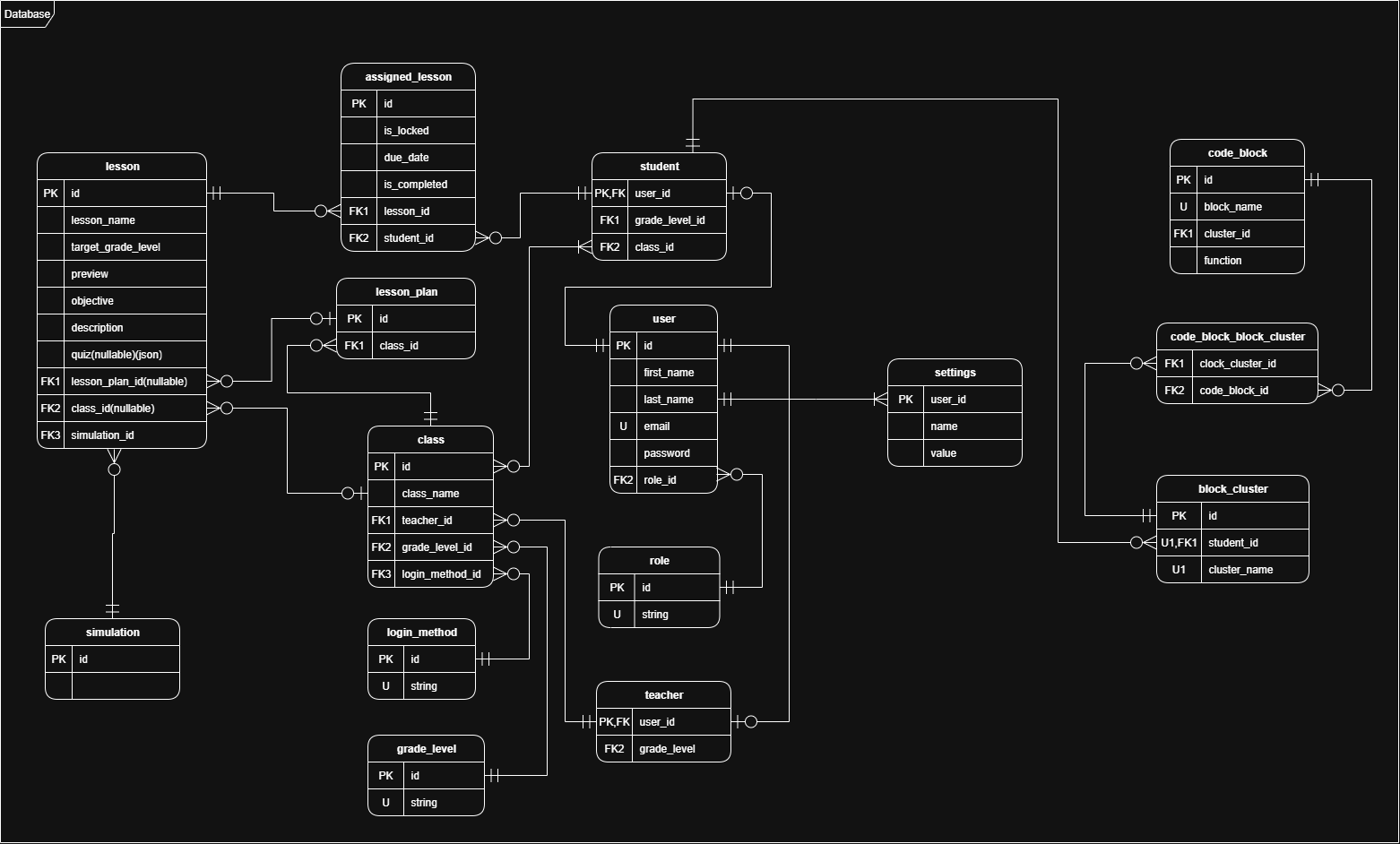
The database design centers around three main functional areas:
- User Management: Student and teacher accounts with authentication
- Lesson & Class Management: Teacher-created lessons, class organization, and assignments
- Code Persistence: Student-created code blocks and saved work
Planned Tables
User Tables
student
Stores student account information and authentication credentials.
Purpose: Manages K-12 student accounts with grade-level tracking for adaptive UI and lesson filtering.
Key Features:
- Personal identifying information (PII) stored securely per FERPA requirements
- Grade level tracking (K-12) for age-appropriate lesson presentation
- Email-based authentication with optional one-time code login for younger students
teacher
Stores teacher account information and authentication credentials.
Purpose: Manages teacher accounts with two-factor authentication (2FA) support.
Key Features:
- Email and password authentication
- 2FA email verification for enhanced security
- Supports multiple class management per teacher
Class & Lesson Management Tables
class
Represents a teacher’s class with associated students.
Purpose: Groups students together for lesson assignment and progress tracking.
Key Features:
- Grade level targeting for appropriate lesson recommendations
- Configurable student login methods (email/password, sign-in code, or link)
- Teacher ownership for multi-class management
lesson
Defines reusable lesson templates with objectives and requirements.
Purpose: Stores lesson metadata, objectives, simulation configuration, and completion criteria.
Key Features:
- Difficulty rating and recommended grade level for filtering
- Simulation environment selection (e.g., combine harvester)
- Completion requirements (steps completed, code template match, or statistic threshold)
- Preview images and descriptions for lesson browsing
- Popularity tracking for sorting search results
assigned_lesson
Links lessons to classes or individual students with due dates and customization.
Purpose: Tracks lesson assignments, due dates, and teacher-customized versions.
Key Features:
- Class-wide or individual student assignment
- Due date tracking with past-due notifications
- Scheduled posting for future assignments
- Customized lesson parameters (altered requirements, renamed lessons)
- Email notification flags for assignment alerts
simulation
Stores simulation environment configurations and initial states.
Purpose: Defines the simulation world that students interact with through their code.
Key Features:
- Initial field state (crop types, tile layout)
- Simulation parameters (yield scoring, weather conditions)
- Unlocked block library for grade-level restrictions
- Custom block templates for advanced students (grades 9-12)
Code Persistence Tables
code_block
Stores individual Blockly code blocks created by students.
Purpose: Persists the atomic units of student-created code for saving and loading work.
Key Features:
- Blockly block type and configuration
- Parameter values for each block
- Connection information for block assembly
block_cluster
Groups related code blocks into reusable templates or saved work.
Purpose: Enables students to save their work in progress and create custom block templates (grades 9-12).
Key Features:
- Named clusters for organization (“My Harvester Code”, “Planting Template”)
- Student ownership for personal code libraries
- Lesson association for auto-saving work in progress
- Custom template flag for reusable code chunks
Features Dependent on Database Integration
The following features are documented in the specification but cannot be implemented until the database schema is integrated:
Student Portal Features
- Login System: Email/password authentication and one-time code login
- Progress Tracking: Lesson completion status and curriculum path visualization
- Grade Display: Point averages and efficiency ratings (grades 6-12)
- Saved Work: Persistent code blocks and lesson progress across sessions
Teacher Portal Features
- Class Management: Creating, viewing, and deleting classes
- Student Management: Adding/removing students, viewing grades
- Lesson Assignment: Assigning lessons to classes or individuals with due dates
- Progress Monitoring: Class-wide and individual student performance tracking
- Lesson Customization: Creating and saving custom lesson variants
Lesson Designer Features
- Lesson Creation: Building new lessons with custom objectives and simulations
- Lesson Publishing: Saving lessons to the shared lesson library
- Lesson Drafts: Saving work-in-progress lessons before assignment
Advanced Student Features (Grades 9-12)
- Custom Block Templates: Saving and reusing code block clusters
- Efficiency Tracking: Historical performance graphs across lessons
- Total Cash Earned: Cumulative yield score tracking
Database Technology
The planned database uses PostgreSQL 17 (Alpine Linux variant) as specified in the Docker Compose configuration. PostgreSQL was chosen for:
- ACID Compliance: Ensures data integrity for student grades and PII
- Scalability: Supports 1,000–10,000+ concurrent users per technical requirements
- JSON Support: Flexible storage for Blockly block configurations
- Open Source: No licensing costs for educational deployment
Security & Compliance Requirements
The database implementation must conform to:
- FERPA: Secure storage of student PII and academic information
- ADA: Accessibility support in all database-driven UI components
- Authentication: Password hashing (bcrypt/Argon2) and 2FA for teachers
- Encryption: TLS for database connections, encrypted backups
Current Database Status
As of Sprint 5, the database is in the following state:
| Component | Status |
|---|---|
| PostgreSQL service | ✅ Provisioned in Docker Compose |
| Database connection | ❌ Not configured in ASP.NET Core |
| Entity Framework models | ❌ Not created |
| Authentication system | ❌ Not implemented |
| Lesson storage | ❌ Not implemented |
| Code persistence | ❌ Not implemented |
The database is listed in the Backlog for future sprints along with student/teacher dashboards and lesson planner features.
What’s Next
- Configuration & Environment: Review database connection settings in Docker Compose
- Installation & Setup: Learn how to access the PostgreSQL service in the devcontainer
- Simulation Engine Architecture: Understand the client-side simulation that will eventually persist to the database